Many small business owners in Slovakia struggle to set up Google Ads properly and often spend their budget without a clear strategy. The result is campaigns that don’t deliver the expected return and waste money. Set up and optimized the right way, though, your campaigns can significantly increase your website traffic and sales. This article gives you a clear, practical guide tailored to small and medium-sized businesses that takes into account the Slovak market and current trends in 2026.
Contents
- Key takeaways
- Getting ready to set up Google Ads
- Step by step: how to set up Google Ads
- Optimizing bids and budget for a better return
- Monitoring and tracking campaign performance
- Get more out of Google Ads with Tronos
- Frequently asked questions
Key takeaways
| Point | Details |
|---|---|
| Account setup | Before you launch a campaign, create a Google Ads account and get your company details and billing information ready. |
| Campaign choice | Choose the campaign type based on your business goal – usually Search if you’re new to advertising. |
| Budget | A daily budget of €10–50 is optimal for small businesses testing Google Ads on the Slovak market. |
| Smart Bidding | Automated bid optimization only makes sense for campaigns with enough conversion volume. |
| Monitoring | Regularly tracking metrics and adjusting keywords keeps campaign performance growing. |
Getting ready to set up Google Ads
Before you launch any ad campaign, you need to prepare everything you’ll need and decide on the basic parameters. You create a Google Ads account at google.com/ads, where you sign in with your Google account. During registration, enter accurate company details, including your business name, address and billing information – these details show up in your ads and affect how trustworthy you look.
The next step is choosing a campaign based on your business’s primary goal. If you want to sell more products, focus on conversions. For building brand awareness, a campaign focused on traffic is a better fit. Setting up a Google Ads account involves signing in, choosing a campaign goal, a type, keywords and a budget – and that gets your advertising off to the right start.
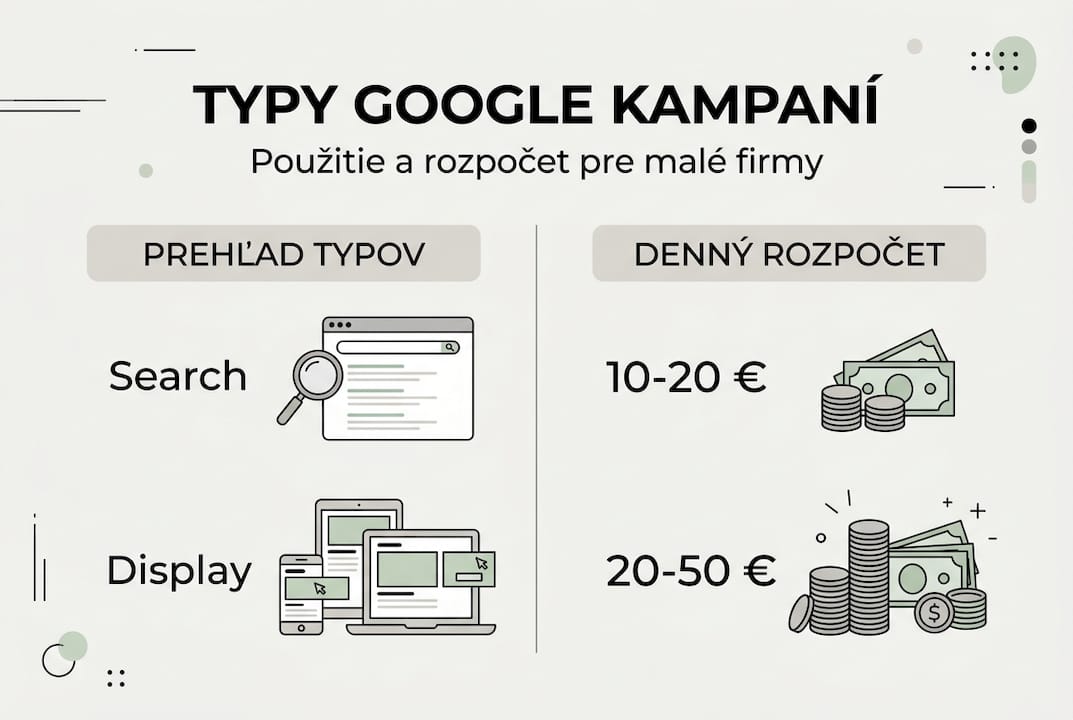
A basic overview of the available campaign types helps you find your way around the options. Search campaigns show your ads in Google Search when people look for specific products or services. Display campaigns use visual banners on partner websites and work well for building awareness. For small businesses, a Search campaign is usually the first choice because it reaches customers with a clear intent to buy.
Setting a budget is key to keeping a campaign sustainable. For small businesses on the Slovak market, a daily budget of €10 to €50 is common, which lets you test effectiveness without much financial risk. Higher budgets only make sense once you’ve confirmed the campaign delivers a positive return on investment. Don’t forget to set geographic targeting to Slovakia or to the specific regions where you operate.
| Campaign type | Use for SMEs | Daily budget |
|---|---|---|
| Search | Customers with a clear intent to buy | €10–30 |
| Display | Building brand awareness | €15–50 |
| Shopping | Online stores with product catalogs | €20–50 |
Pro tip: Put together a list of your products or services with relevant keywords before you create the campaign. It speeds up setup considerably and makes your targeting more precise. Learn more about the basics in our article what Google Ads is.
Step by step: how to set up Google Ads
Setting up a Google campaign takes a systematic approach that makes sure your ads reach the right customers. Start by creating a Google Ads account if you don’t have one yet, then sign in and click “New campaign.” The system walks you through a wizard where you choose the campaign’s main goal.
Which goal you pick depends on what you want to achieve. To get more orders, choose the “Sales” or “Leads” goal, which optimizes ad delivery for the users most likely to convert. If your main aim is more website traffic, choose “Website traffic.” Each goal affects how Google optimizes your campaigns.
The Search campaign type is the best fit for new advertisers because it shows text ads right in the search results. The steps include creating an account, choosing a goal, picking the campaign type, and setting keywords and a budget of €10–50 per day for optimal results. The big advantage of Search campaigns is that you reach people who are actively looking for what you offer.
Choosing and setting up keywords is the most important part of the whole process. Think about which terms your potential customers would type into a search engine. Use Google Keyword Planner to identify relevant keywords with enough search volume. Prioritize longer phrases with a specific intent, such as “buy office furniture Bratislava” instead of just “furniture.”

A daily budget of €10 to €50 is the standard for small businesses getting started with Google Ads. Lower budgets let you test a campaign without much risk, while higher budgets speed up collecting the data you need for optimization. You can adjust your budget at any time based on results.
| Step | Description | Time estimate |
|---|---|---|
| 1. Creating the account | Registering and entering company details | 10–15 minutes |
| 2. Choosing a goal | Defining the campaign’s primary goal | 5 minutes |
| 3. Campaign type | Choosing Search as a beginner | 5 minutes |
| 4. Keywords | Selecting 10–20 relevant terms | 20–30 minutes |
| 5. Budget | Setting a daily limit | 5 minutes |
Pro tip: When you set up your keywords, include specific purchase words like “purchase,” “order” or “buy.” This boosts conversions because you reach customers who are ready to buy. A more detailed guide to Google Ads will help you with more advanced settings.
Optimizing bids and budget for a better return
Once your campaign is live, you need to optimize your bidding strategy to get the maximum return on investment. Google Ads offers two main approaches: Smart Bidding, which uses machine learning to optimize automatically, and manual bidding, where you have full control over how much you’re willing to pay per click.
Smart Bidding is an automated strategy that adjusts your bids in real time based on the likelihood of a conversion. The system analyzes signals such as device, location, time of day and search history to optimize performance. Smart Bidding works better for campaigns with a large volume of data, while manual bids suit smaller budgets and testing new strategies.
When does Smart Bidding make sense? If your campaign generates at least 30 conversions a month, the automation has enough data to optimize effectively. For new campaigns or campaigns with a limited budget, it’s better to start with manual bids so you stay in control and learn which keywords bring the best results.
The advantage of manual bids is that you can test different amounts for individual keywords and react quickly to changes. You can raise bids on terms that bring conversions and lower them on terms that just eat up your budget without results. This flexibility is especially valuable in the early stages of a campaign.
| Feature | Smart Bidding | Manual bids |
|---|---|---|
| Automation | Fully automated optimization | Manual control of every bid |
| Best for | Campaigns with 30+ conversions/month | New campaigns, testing |
| Time required | Minimal | Higher, needs regular adjustments |
| Flexibility | Limited | High, full control |
Practical tips for monitoring campaigns that don’t pay off include regularly checking metrics such as CTR, CPC and conversion rate. If a campaign falls short of expectations, analyze your keywords and exclude the ones that generate clicks without conversions. Adjust your budget so that a bigger share goes to your best-performing campaigns and ad groups.
Pro tip: Check keyword performance regularly and adjust bids based on how well each keyword works – ideally once a week during the first months of a campaign. That way you can quickly spot and cut wasted spend. Read more about the process in our article on optimizing Google Ads.
Monitoring and tracking campaign performance
Tracking performance is key to the long-term success of any Google Ads campaign. Without regular monitoring and adjustments, you risk spending your budget on ineffective ads that don’t deliver results. The Google Ads interface gives you comprehensive tools for analyzing metrics that tell you exactly how your campaign is doing.
How do you use the Google Ads interface to track metrics? The core metrics include CTR (click-through rate), which shows what percentage of people clicked your ad after seeing it, CPC (cost per click), and conversion rate, which measures how many clicks led to the desired action. Monitoring and optimization are the key to successful Google Ads campaigns because they let you react quickly to changes.
The most common campaign management mistakes include:
- Ignoring negative keywords, which leads to ads showing up for irrelevant searches
- Not testing ads enough and using only one version of the copy
- Choosing keywords that are too broad and bring in unqualified traffic
- Neglecting mobile optimization, even though most searches come from mobile devices
- Insufficient conversion tracking, which makes it impossible to measure your real return
You can’t overstate the importance of updating your keywords regularly. The market changes, your competitors adjust their strategies and search trends evolve. Add new keywords you find in your search terms reports and remove the ones that don’t work. Negative keywords are just as important because they keep your ads from showing up for the wrong searches.
For A/B testing your ads, create at least two versions of each ad with different headlines or descriptions. Run them at the same time, and once you have enough data (at least 100 clicks per version), evaluate which one performs better. Keep the winner and create a new variant for the next test.
Regular reporting, with an overview of what to change for better reach, should be part of your routine. Set up a weekly or monthly schedule to review performance and identify areas for improvement. Track trends over time, not just current numbers, so you understand how the campaign is developing.
Adapting your strategy to changes in the market and among your competitors means you have to stay flexible. If competitors raise their bids, you may need to adjust your budget or target less competitive keywords. Watch for changes in customer behavior and adapt your ads to their current needs. Find more on using it effectively in our article on Google Ads for business.
Get more out of Google Ads with Tronos
Setting up and optimizing Google Ads can take a lot of time and requires constantly keeping up with new trends. If you want maximum results without having to become a PPC expert yourself, professional support is the answer. Tronos offers end-to-end website design optimized for conversions, which perfectly complements your ad campaigns.
Our agency specializes in optimizing Google Ads for a better return on investment, which means your budget works harder. Working with experts helps you gain a competitive edge and boost your online visibility without spending time learning complex tools. Find out more about our solutions for Google Ads for small and medium-sized businesses on our website.
Frequently asked questions
How long does it take to set up your first Google ad?
The technical campaign setup itself takes about 45 to 60 minutes if you have everything ready, including keywords and ad copy. Preparing the strategy and researching keywords can take another 2 to 3 hours.
How much should I invest in Google Ads as a small business?
For small businesses in Slovakia, we recommend starting with a daily budget of €10 to €30 to test effectiveness. Once you’ve confirmed the campaign delivers a positive return, you can gradually increase the budget to €50 a day or more.
Can I set up Google Ads myself without technical knowledge?
Yes, Google Ads is designed so that even beginners without technical skills can use it. The wizard walks you through the basic setup step by step. For the best results, though, we recommend getting at least a basic understanding of how PPC advertising works.
When is Smart Bidding a better choice than manual bids?
Smart Bidding is effective when your campaign generates at least 30 conversions a month, because the system needs enough data to optimize properly. For new campaigns or campaigns with fewer conversions, manual bids are a better fit.
How often should I monitor and adjust my campaign?
During the first few weeks, check performance at least three times a week so you can spot problems quickly. Once the campaign stabilizes, a weekly check with a detailed monthly review and strategy adjustments is enough.